
wireshark 보조 프로그램
mergecap : 여러 개의 pcap,pcapng 파일을 하나의 덤프 파일로 통합해주는 도구
wireshark를 설치할 때 같이 설치된다.
더보기
Usage: mergecap [options] -w <outfile>|- <infile> [<infile> ...]

Output:
  -a                concatenate rather than merge files.
                    default is to merge based on frame timestamps.
  -s <snaplen>      truncate packets to <snaplen> bytes of data.
  -w <outfile>|-    set the output filename to <outfile> or '-' for stdout.
  -F <capture type> set the output file type; default is pcapng.
                    an empty "-F" option will list the file types.
  -I <IDB merge mode> set the merge mode for Interface Description Blocks; default is 'all'.
                    an empty "-I" option will list the merge modes.

Miscellaneous:
  -h, --help        display this help and exit.
  -V                verbose output.
  -v, --version     print version information and exit.
mergecap -v -W output.pcap input1.pcap input2.pcap #패킷 파일 이어붙이기

mergecap -v -W output.pcap input1.pcap input2.pcap -s 2222 #특정 길이로 합치기

mergecap -v -W output.pcap -T input1.pcap input2.pcap # 캡슐화 타입 정하기
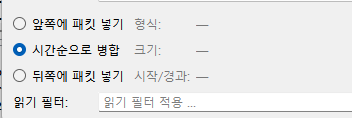
wireshark 앱 이용하기
1. 병합하고 싶은 pcap/pcapng 파일 (input1) 열기
2. 파일 > 병합

3. 병합하고 싶은 파일 (input2) 선택 후 옵션 선택
'Guidebook' 카테고리의 다른 글
| Virtual box 편리한 설정 (0) | 2026.05.12 |
|---|---|
| KVM 삭제 (0) | 2025.04.03 |
| VS code 원격 연결 및 사용 방법 (0) | 2025.03.29 |